A complete engineering walkthrough — with tool-by-tool steps and interface walkthroughs — for building a multi-agent competitor research pipeline entirely within your Azure subscription, using Claude as the reasoning core and Azure-native services for every supporting capability.
1. Why agents, not scripts — and why one subscription
Competitor research looks deceptively simple to automate — scrape a few pages, summarise the content, send an email. In practice, the task involves navigating JavaScript-rendered pricing tables, reconciling contradictory signals across press coverage and job boards, interpreting ambiguous product announcements, and framing all of it through your own strategic position. Deterministic scripts break on the first edge case. What the problem genuinely requires is adaptive reasoning across heterogeneous data sources — which is exactly what a fleet of specialised AI agents provides.
The earlier multi-vendor version of this architecture called for NewsAPI, Twitter/X API, Reddit API, LinkedIn API, Qdrant, LangGraph, Redis, and Firecrawl alongside Copyleaks and Playwright — eleven separate vendor relationships to manage, eleven sets of API keys to rotate, and eleven billing lines to reconcile. That operational overhead turns a weekly intelligence workflow into an engineering maintenance burden.
Azure AI Foundry collapses almost all of that into a single Azure subscription. Claude Sonnet 4.6 and Haiku 4.5 are deployed from the Foundry model catalogue. Bing Search replaces every news and social API. Azure AI Search replaces Qdrant. Azure Blob Storage replaces both Redis Streams and a PostgreSQL diff store. The Microsoft Agent Framework replaces LangGraph. Azure Monitor replaces a separate observability stack. The entire fleet runs under one Microsoft Entra ID identity — one IAM model, one audit trail, one bill.
Only Copyleaks (plagiarism detection — no Azure-native equivalent exists) and Playwright (a Python library, not a SaaS subscription) sit outside this boundary. Everything else runs inside your Azure tenant and is eligible for your existing Microsoft Azure Consumption Commitment.
Single-subscription billing
Claude usage is billed through the Azure Marketplace under your existing Azure agreement and counts toward your MACC spend commitment. There is no separate Anthropic contract. Azure is currently the only cloud providing access to both Claude and GPT frontier models under a single subscription with unified billing.
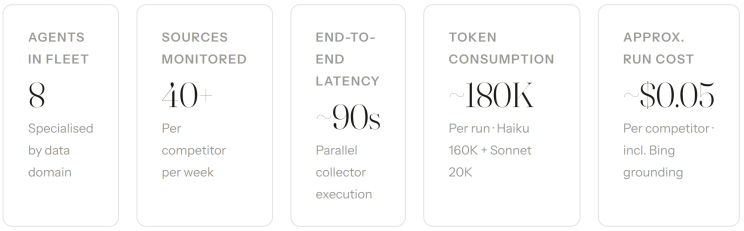
2. System architecture
The pipeline follows the same fan-out / fan-in pattern as before, but every component now runs inside the Foundry project boundary. The Orchestrator agent dispatches Collector agents in parallel using the Microsoft Agent Framework's multi-agent workflow primitives. Collectors push structured results to Azure Blob Storage, which acts as the event bus between collection and analysis. The Analyst agent retrieves prior-week context from an Azure AI Search vector store, reasons with Claude Sonnet 4.6, and produces a structured IntelReport. The Validator calls Copyleaks before the Brand Renderer generates the final PDF.
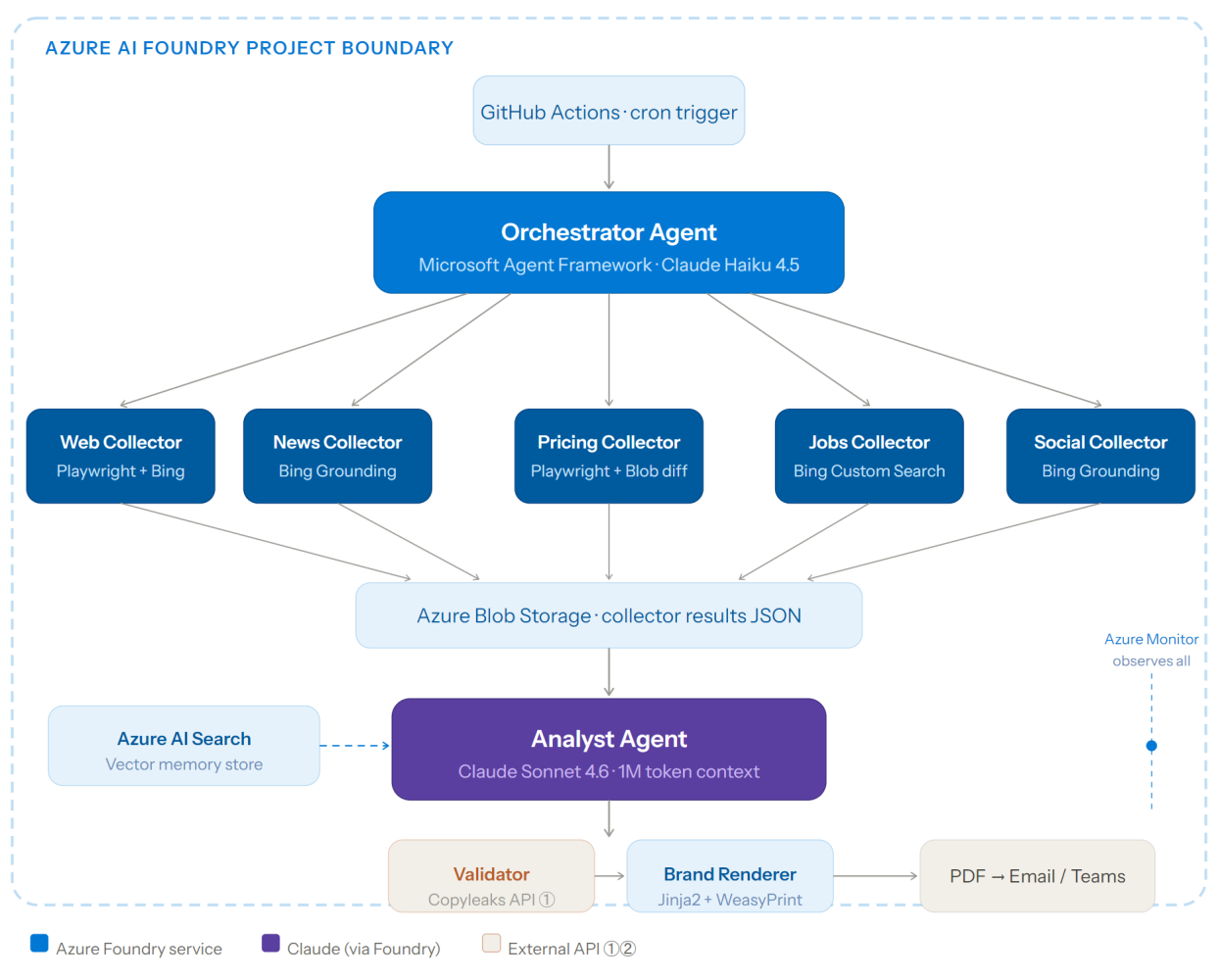
Figure 1 — Full pipeline inside a single Azure AI Foundry project boundary. The only components crossing the Azure perimeter are the Copyleaks API call (validation) and Playwright (local headless browser library). All other services are Azure-native and share one IAM principal.
3. Agent roles — Azure-native tooling
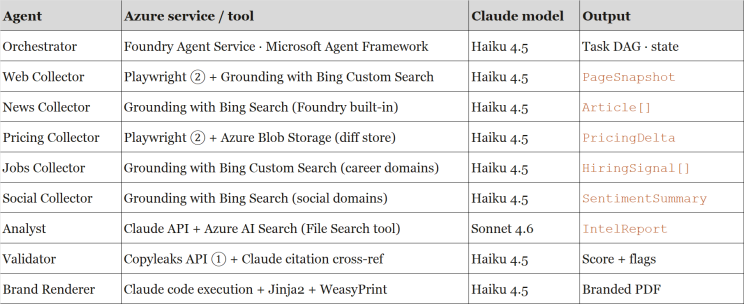
Each agent is deployed as an Azure AI Foundry Agent Service instance backed by a Claude model deployment. The table below maps every agent to its specific Azure service and Claude model tier. Heavier reasoning tasks use Sonnet 4.6; lightweight dispatch and formatting tasks use Haiku 4.5 to optimise cost.
Why two Claude tiers?
Claude Sonnet 4.6 (1M-token context, adaptive extended thinking) handles the Analyst's cross-source synthesis — the cognitively demanding step. All other agents use Haiku 4.5, which delivers near-frontier performance at one-third the cost. The Foundry Model Router can automate this tier selection in future releases.
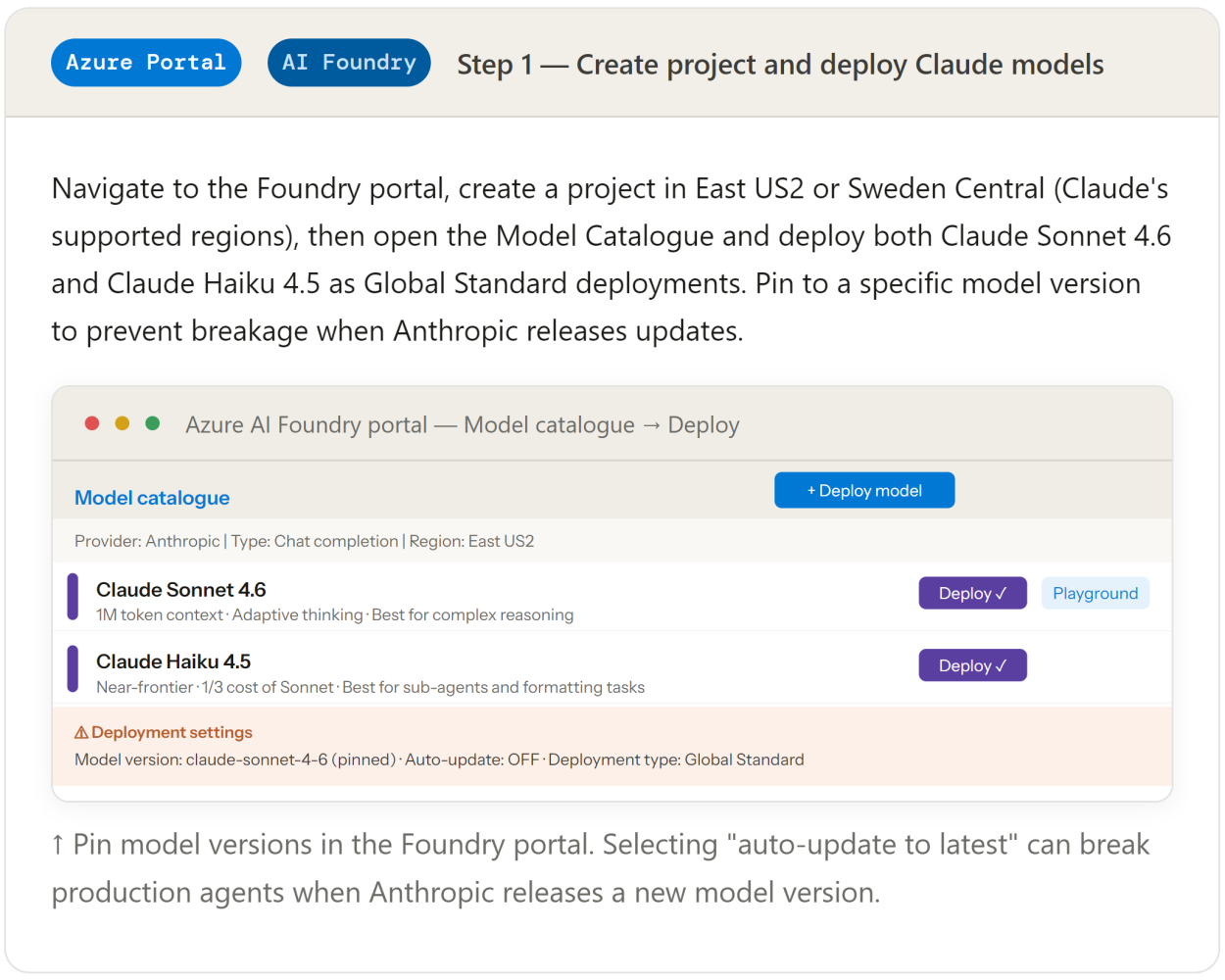
4. Azure AI Foundry project setup
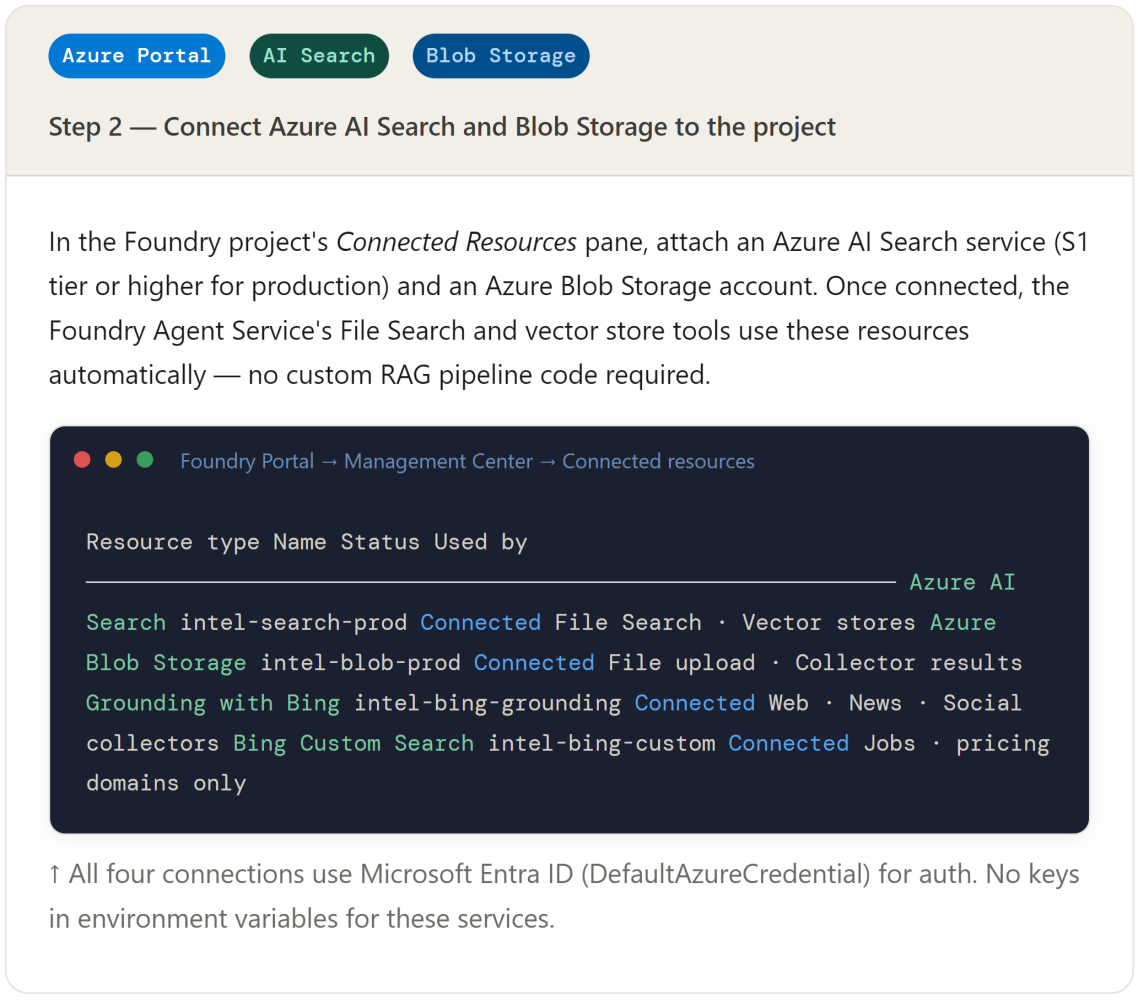
Everything starts with a single Foundry project. One project, one endpoint, one credential chain. All agents, model deployments, storage connections, and search indexes live inside it. Access is governed by Microsoft Entra ID — no API keys scattered across config files for most services.
5. Data ingestion pipeline — step by step
All five Collector agents share the same internal loop: fetch → normalise → upload to Blob → signal completion. The main difference between them is which Foundry-native tool they use for the fetch step. Three collectors use Grounding with Bing (news, social, jobs) and two use Playwright with Bing Custom Search for domain-scoped crawling (web pages, pricing).
5.1 Web Collector — Playwright + Bing Custom Search
JavaScript-rendered product pages still need a headless browser. Playwright remains a Python library dependency (not a SaaS subscription). Once the raw DOM is captured, Bing Custom Search — configured to scope queries to the competitor's own domain — is used for structured information extraction, replacing the separate Firecrawl subscription from the previous architecture.

Playwright captures the fully-rendered DOM. The agent then calls Bing Custom Search (configured with the competitor's domain) to run targeted extraction queries against that snapshot, and uploads the normalised result to Blob Storage for the Analyst.
web_collector_agent.py · Foundry Agent Service
from azure.ai.projects import AIProjectClient
from azure.ai.agents.models import BingCustomSearchTool
from azure.identity import DefaultAzureCredential
project = AIProjectClient(
endpoint=os.environ["FOUNDRY_PROJECT_ENDPOINT"],
credential=DefaultAzureCredential() # Entra ID — no key
)
# Bing Custom Search scoped to competitor domain
bing_tool = BingCustomSearchTool(
connection_name="intel-bing-custom",
instance_name="acmecorp-domain" # acme.io only
)
agent = project.agents.create_agent(
model="claude-haiku-4-5",
name="web-collector",
instructions=WEB_COLLECTOR_PROMPT,
tools=bing_tool.definitions
)
# Playwright for JS-rendered pages (library — not a subscription)
page_html = await playwright_fetch(competitor_url, selectors=PRICING_SELECTORS)
snapshot = normalise_html(page_html)
upload_to_blob(snapshot, container="collector-results", run_id=run_id)
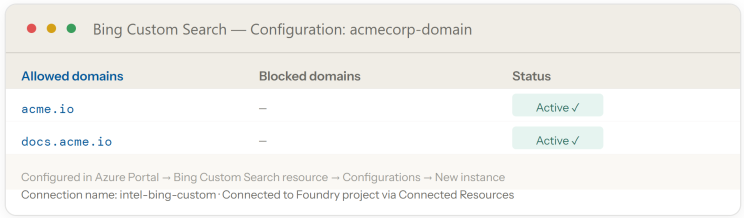
Bing Custom Search instances are created in the Azure Portal, then connected to the Foundry project. Each competitor gets its own configuration instance targeting that company's public domains — no separate API subscription needed beyond the single Bing resource.
5.2 News Collector — Grounding with Bing Search
The News Collector uses the Foundry Agent Service's built-in Grounding with Bing Search tool — eliminating the separate NewsAPI subscription entirely. The agent submits a natural-language query; Bing returns real-time web data with citations, which Haiku 4.5 normalises into the Article schema.

news_collector_agent.py
from azure.ai.agents.models import BingGroundingTool
bing_tool = BingGroundingTool(
connection_name="intel-bing-grounding"
)
agent = project.agents.create_agent(
model="claude-haiku-4-5",
name="news-collector",
instructions="""
Search for news about {competitor} published in the last 7 days.
Focus on: product launches, pricing changes, funding, partnerships.
Return citations with each finding. Output as JSON Article array.
""",
tools=bing_tool.definitions
)
thread = project.agents.threads.create()
project.agents.messages.create(
thread_id=thread.id, role="user",
content=f"Research AcmeCorp — week of {week_start}"
)
run = project.agents.runs.create_and_process(
thread_id=thread.id, agent_id=agent.id
)
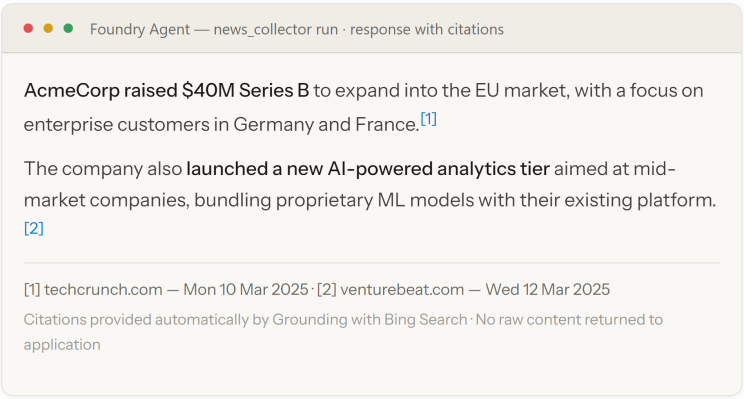
Grounding with Bing returns model-generated responses with cited URLs. Raw Bing results are not exposed to the application — the agent receives the grounded synthesis directly.
5.3 Pricing Collector — Playwright + Azure Blob diff store
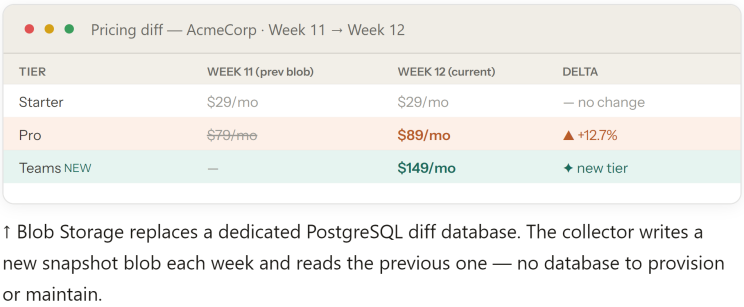
Pricing snapshots are stored as JSON files in Azure Blob Storage, one blob per competitor per week. The Pricing Collector fetches the current week's snapshot with Playwright, downloads last week's blob, runs a structured diff, and uploads both the new snapshot and the delta back to Blob — replacing the need for a separate PostgreSQL database.

pricing_collector_agent.py
from azure.storage.blob import BlobServiceClient
from azure.identity import DefaultAzureCredential
blob_client = BlobServiceClient(
account_url=f"https://{STORAGE_ACCOUNT}.blob.core.windows.net",
credential=DefaultAzureCredential() # Entra ID — no key
)
# Download previous week snapshot from Blob
prev_blob = blob_client.get_blob_client(
container="pricing-snapshots",
blob=f"acmecorp/week_{week_num - 1}.json"
)
previous = PricingSnapshot.model_validate_json(prev_blob.download_blob().readall())
# Fetch current snapshot with Playwright
current_html = await playwright_fetch(PRICING_URL, selectors=PRICE_SELECTORS)
current = extract_pricing_snapshot(current_html)
# Diff and upload both
delta = diff_pricing(current, previous)
upload_json(blob_client, current, f"acmecorp/week_{week_num}.json")
upload_json(blob_client, delta, f"acmecorp/delta_{week_num}.json")
5.4 Jobs and Social Collectors — Grounding with Bing
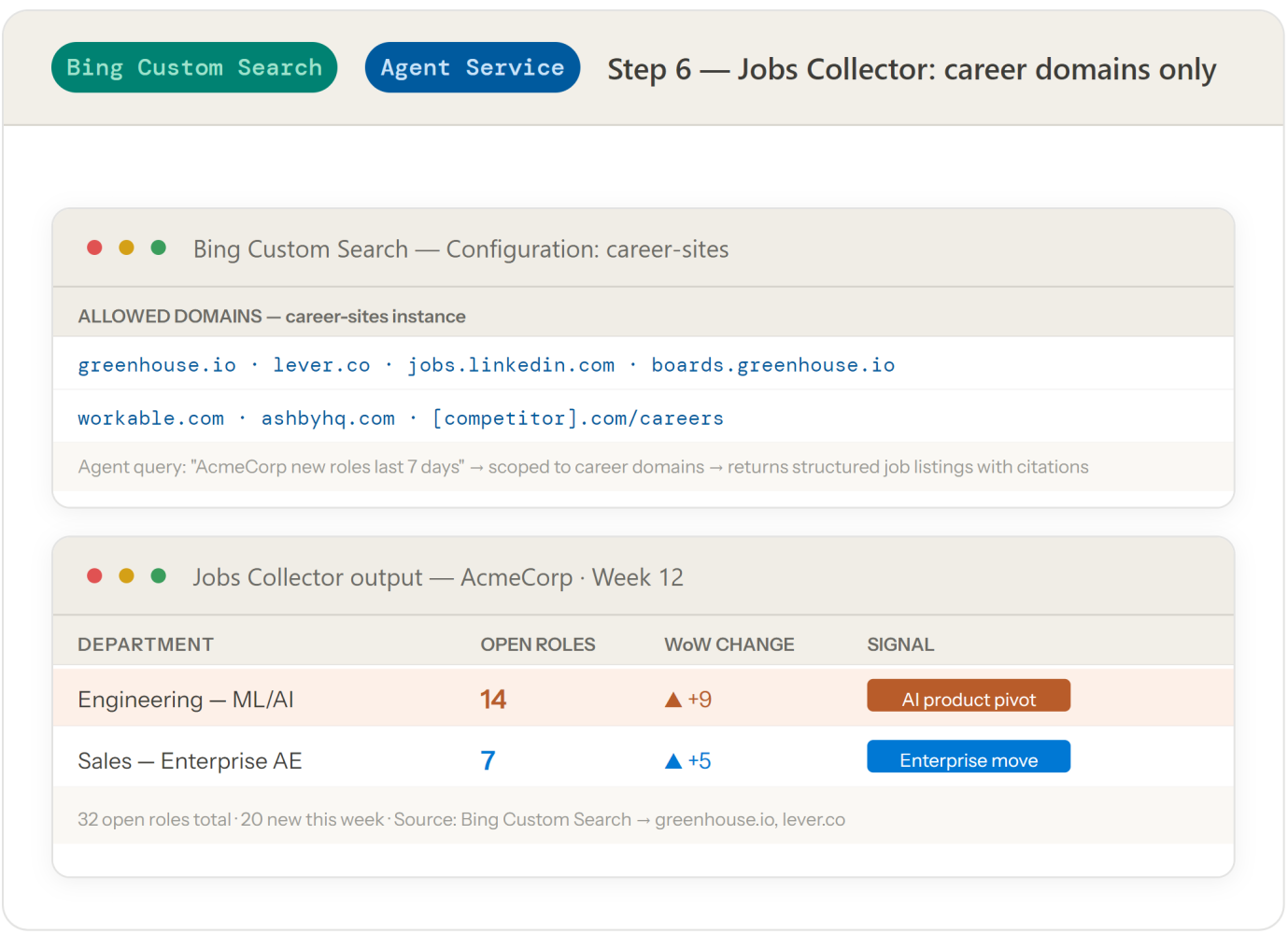
Both the Jobs Collector and the Social Collector use Grounding with Bing Search, configured with different domain constraints. The Jobs Collector uses a Bing Custom Search instance scoped to career-site domains (greenhouse.io, lever.co, jobs.linkedin.com). The Social Collector uses the standard Bing Grounding tool with a query pattern that targets Reddit and public social content — replacing the separate Twitter/X and Reddit API subscriptions.
6. Orchestration — Microsoft Agent Framework
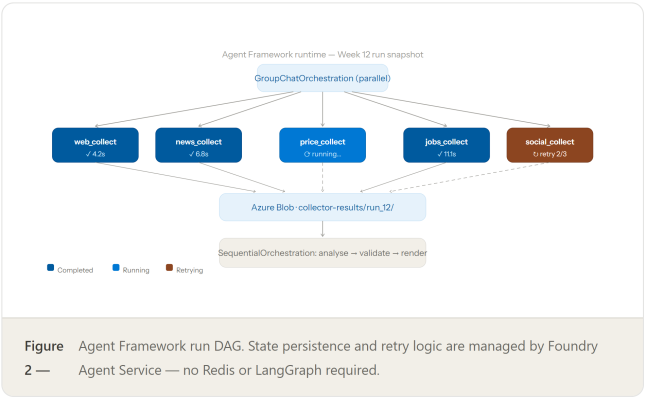
The Microsoft Agent Framework (the converged Semantic Kernel + AutoGen SDK) is the orchestration layer. It runs inside Azure AI Foundry Agent Service — a managed runtime that handles state persistence, error recovery, and multi-agent context sharing without a separately provisioned Redis instance or LangGraph setup.

The Agent Framework provides a GroupChatOrchestration and a SequentialOrchestration primitive. For the collector fan-out we use a group chat with a round-robin manager; for the analysis → validate → render sequence we use sequential orchestration.
orchestrator.py · Microsoft Agent Framework
from semantic_kernel.agents import AzureAIAgent, AzureAIAgentSettings from semantic_kernel.agents.orchestration import ( GroupChatOrchestration, SequentialOrchestration, RoundRobinManager )
# All agents are Foundry Agent Service instances — Entra ID auth async with DefaultAzureCredential() as creds, \ AzureAIAgent.create_client(credential=creds) as client:
# Collector agents — parallel fan-out collectors = [ await AzureAIAgent.create(client, settings=AzureAIAgentSettings( model="claude-haiku-4-5", name=name, instructions=instructions )) for name, instructions in COLLECTOR_SPECS ] collector_chat = GroupChatOrchestration( members=collectors, manager=RoundRobinManager() # runs all collectors in parallel )
# Analysis pipeline — sequential analyst = await AzureAIAgent.create(client, settings=ANALYST_SETTINGS) validator = await AzureAIAgent.create(client, settings=VALIDATOR_SETTINGS) renderer = await AzureAIAgent.create(client, settings=RENDERER_SETTINGS) pipeline = SequentialOrchestration(members=[analyst, validator, renderer])
# Run: collect → analyse → validate → render collection_results = await collector_chat.invoke(task=RUN_TASK) await pipeline.invoke(task=collection_results)
7. Synthesis and analysis — Claude Sonnet 4.6 + Azure AI Search
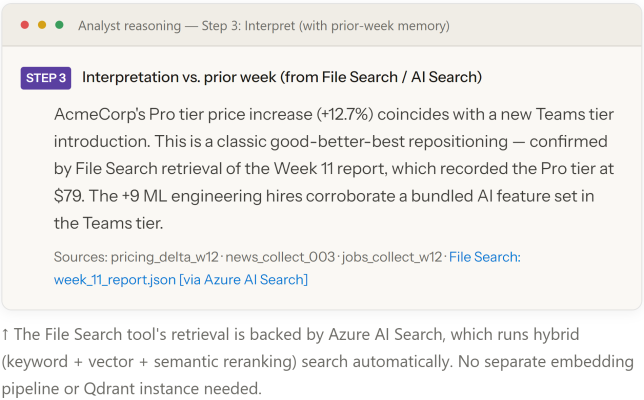
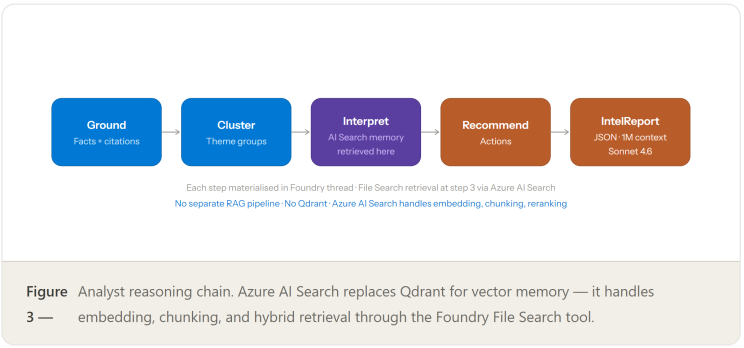
The Analyst agent uses Claude Sonnet 4.6 via the Foundry endpoint — the same model deployed in Step 1. The Foundry Agent Service's built-in File Search tool connects to the Azure AI Search vector store (configured in Step 2) to retrieve prior-week context. This eliminates the need for a separate Qdrant instance: embedding, indexing, chunking, and hybrid retrieval are all handled by Azure AI Search automatically.

Previous weekly reports are stored in a Foundry vector store backed by Azure AI Search. When the Analyst agent runs, the File Search tool automatically retrieves the most relevant prior-week passages and injects them as context — giving the model delta awareness without a bespoke RAG pipeline.
analyst_agent.py · Claude Sonnet 4.6 via Foundry
from azure.ai.projects import AIProjectClient from azure.ai.agents.models import FileSearchTool, ToolResources, VectorStoreDataSource from azure.identity import DefaultAzureCredential
project = AIProjectClient(
endpoint=os.environ["FOUNDRY_PROJECT_ENDPOINT"],
credential=DefaultAzureCredential()
)
# Upload this week's collector results to the memory vector store
batch = project.agents.vector_stores.file_batches.upload_and_poll(
vector_store_id=INTEL_VECTOR_STORE_ID, # backed by Azure AI Search
files=[open(f"collector-results/run_{week}.json", "rb")]
)
# Analyst agent: Sonnet 4.6 + File Search over the vector store
agent = project.agents.create_agent(
model="claude-sonnet-4-6",
name="analyst",
instructions=ANALYST_SYSTEM_PROMPT, # includes brand voice profile
tools=[FileSearchTool().definitions],
tool_resources=ToolResources(
file_search=FileSearchToolResources(
vector_store_ids=[INTEL_VECTOR_STORE_ID]
)
)
)
# Run reasoning chain: Ground → Cluster → Interpret → Recommend → Output
thread = project.agents.threads.create()
project.agents.messages.create(
thread_id=thread.id, role="user",
content=ANALYST_PROMPT.format(collected_data=collector_json, week=week_num)
)
run = project.agents.runs.create_and_process(thread_id=thread.id, agent_id=agent.id)
8. Brand-aware rendering — Claude code execution + WeasyPrint
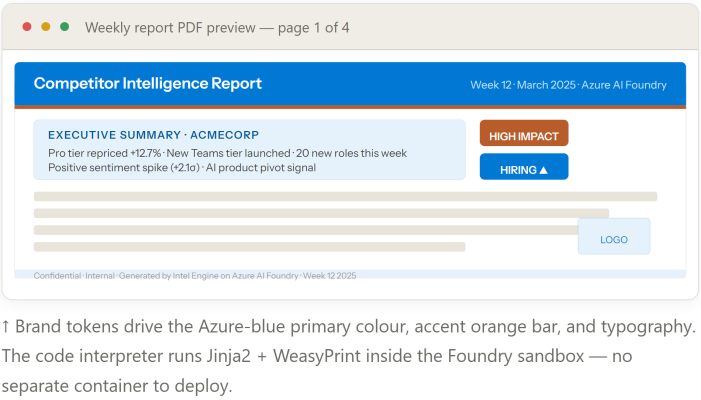
The Brand Renderer uses Claude's built-in code execution tool (available natively in Foundry) to generate the Jinja2-rendered HTML from the IntelReport JSON and brand token file, then calls WeasyPrint to produce the final PDF. This keeps the rendering logic inside the agent's reasoning loop rather than in a separate microservice.

Brand tokens are stored as a JSON file in Blob Storage and fetched at render time. The renderer agent is instructed to read the brand token file and the IntelReport, render the Jinja2 template, and produce the PDF — using Claude's code execution capability rather than a separate container.
brand_renderer_agent.py
from azure.ai.agents.models import CodeInterpreterTool
renderer = project.agents.create_agent(
model="claude-haiku-4-5",
name="brand-renderer",
instructions=RENDERER_PROMPT,
tools=[CodeInterpreterTool().definitions], # built-in Foundry tool
tool_resources=CodeInterpreterToolResources(
file_ids=[brand_tokens_file_id, template_file_id]
)
)
# Renderer generates HTML with Jinja2, then PDF with WeasyPrint
# All executed inside the Foundry code interpreter sandbox — no container
project.agents.messages.create(
thread_id=thread.id, role="user",
content=f"""
Using brand_tokens.json and report_template.html.j2,
render the attached IntelReport as a branded PDF.
Apply all typography, colour, and voice rules from brand_tokens.json.
Output: week_{week_num}_{competitor}.pdf
"""
)
9. Plagiarism validation — Copyleaks API
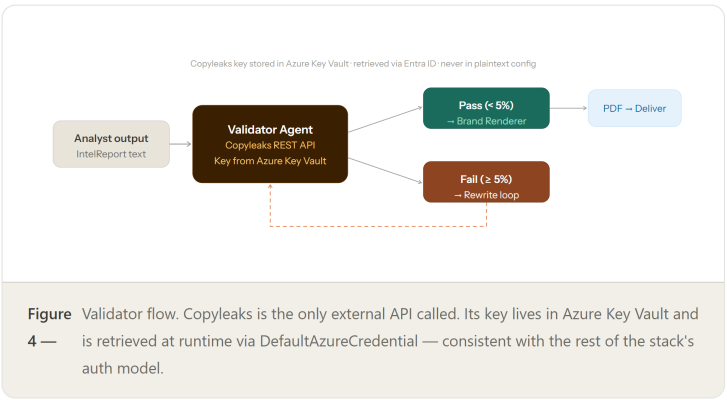
Copyleaks remains the one external SaaS subscription in the stack. No Azure-native plagiarism detection equivalent exists. The Validator agent calls the Copyleaks REST API directly — one endpoint, one API key, one monthly line on the bill.

The Copyleaks API key is stored in Azure Key Vault and fetched at runtime using Entra ID — the only API key in the system that isn't a first-party Azure credential.
validator_agent.py
from azure.keyvault.secrets import SecretClient from azure.identity import DefaultAzureCredential
# Retrieve Copyleaks key from Azure Key Vault — no plaintext secrets
kv = SecretClient(vault_url=KEY_VAULT_URL, credential=DefaultAzureCredential())
copyleaks_token = kv.get_secret("copyleaks-api-token").value
def scan_plagiarism(text: str) -> ValidationResult:
resp = requests.post(
"https://api.copyleaks.com/v3/writer-detector/check",
headers={"Authorization": f"Bearer {copyleaks_token}"},
json={"text": text, "sandbox": False}
)
result = resp.json()
flagged = [p for p in result["results"]
if p["matchedWords"] / len(text.split()) > 0.05]
return ValidationResult(passed=len(flagged)==0, flagged_passages=flagged)
10. Deployment and scheduling — GitHub Actions + Azure Container Apps
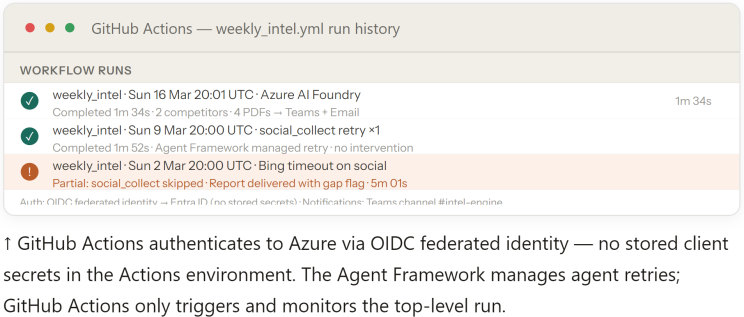
Each agent runs as an Azure Container App. The weekly trigger is a GitHub Actions workflow with a cron schedule. Because every agent uses Foundry Agent Service — a managed runtime — there is no Redis, no task queue, and no separate orchestration infrastructure to keep alive between runs.

.github/workflows/weekly_intel.yml
on:
schedule:
- cron: '0 20 * * 0' # Sunday 20:00 UTC
workflow_dispatch: # manual re-run
jobs:
run-intel:
runs-on: ubuntu-latest
permissions:
id-token: write # OIDC → Entra ID — no stored secrets
steps:
- uses: actions/checkout@v4
- uses: azure/login@v2
with:
client-id: ${{ secrets.AZURE_CLIENT_ID }}
tenant-id: ${{ secrets.AZURE_TENANT_ID }}
subscription-id: ${{ secrets.AZURE_SUBSCRIPTION_ID }}
- name: Trigger Orchestrator
run: |
az rest --method post \
--url "$FOUNDRY_PROJECT_ENDPOINT/openai/v1/runs" \
--body '{"competitor_ids":["acmecorp","betacorp"]}'
11. Observability — Azure Monitor and Foundry tracing
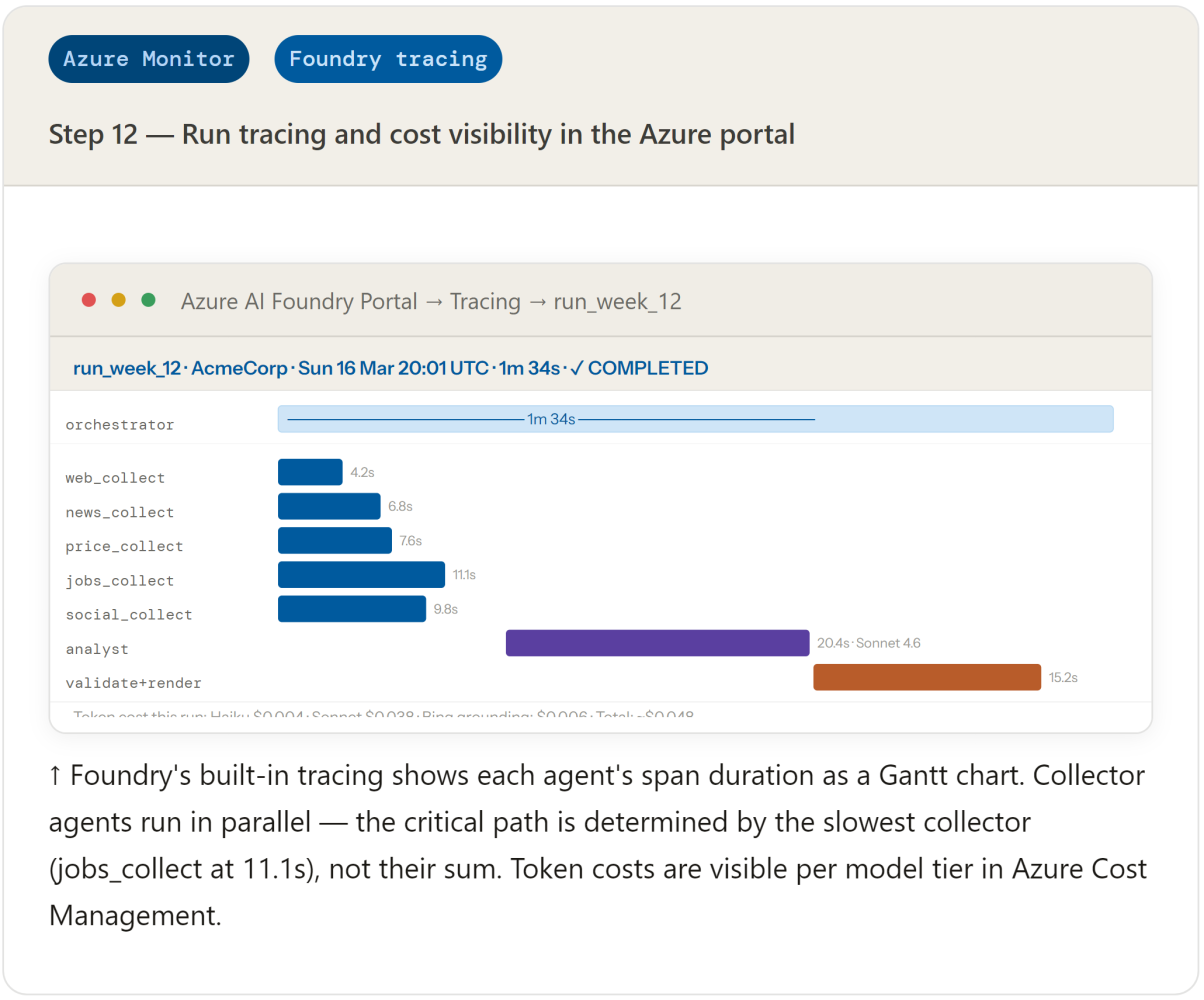
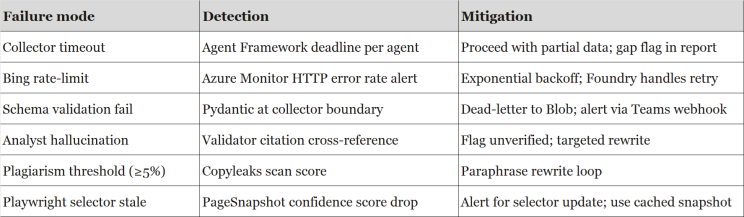
Azure Monitor observes every agent run through standard Azure patterns — no additional observability vendor required. API usage, latency, error rates, and cost per run are all visible in the Azure portal through Azure Monitor and Cost Management.
Where to start
Create a Foundry project, deploy Claude Haiku 4.5, and connect Grounding with Bing. Build a single News Collector agent and test it in the Foundry Playground. Once you trust the grounding quality, add the remaining collectors one at a time — each one is a new Foundry Agent Service instance, not a new vendor contract.
Want to dive deeper or try this out yourself? Check out the full implementation on GitHub:👉 https://github.com/ApexWolf-SuperDev/Competitor-Intelligence-Agents