Sitecore JavaScript Rendering SDK (JSS) empowers developers to build modern, scalable, and high-performance front-end applications that leverage Sitecore’s Headless Services and Experience Edge. Whether you're using Next.js, React, Angular, or Vue, JSS provides the necessary tools and APIs to seamlessly integrate Sitecore-powered content into your applications.
In this guide, I am detailing a few key features and capabilities of JSS with practical examples and references to Sitecore documentation.
1. JSS Application Initialization: Get Started Quickly
JSS provides an initializer that simplifies the process of setting up a new JSS application.
Example: Creating a JSS Application in Next.js
To create a new JSS app using Next.js, run:
npx create-sitecore-jss next my-jss-app
cd my-jss-app
npm install
npm run start
This command scaffolds a JSS Next.js project with essential configurations, including Headless Services support, a predefined component structure, and sample routes.
📌 Reference: JSS Quick Start Guide
2. Node-Based CLI Tools for Managing JSS Applications
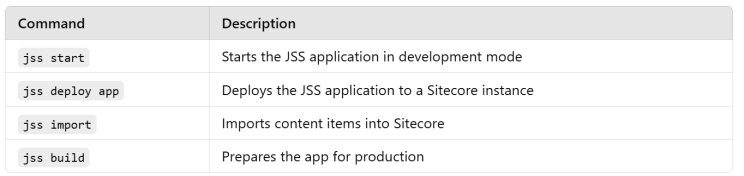
JSS includes a command-line interface (CLI) to streamline common tasks such as deployment, debugging, and configuration.
Example: Deploying a JSS App to Sitecore
jss deploy app --destination <your-sitecore-instance>
Common CLI Commands
📌 Reference: JSS CLI Documentation
3. Core JavaScript SDK for Sitecore Headless Services
JSS applications interact with Sitecore Headless Services through REST or GraphQL APIs.
Example: Fetching Content Using GraphQL
Using the @sitecore-jss/sitecore-jss-nextjs package, you can query Sitecore data via GraphQL:
import { GraphQLClient } from '@sitecore-jss/sitecore-jss-nextjs';
const client = new GraphQLClient({
  endpoint: 'https://your-sitecore-instance/graphql',
});
const query = `
  query {
    item(path: "/sitecore/content/home") {
      name
      fields {
        name
        value
      }
    }
  }
`;
async function fetchData() {
  const result = await client.request(query);
  console.log(result);
}
📌 Reference: Using GraphQL with JSS
4. Abstractions for Front-End Developers
JSS simplifies interactions with Sitecore data by offering utility functions and abstractions, reducing the need to work with low-level APIs.
Example: Using <Text> and <Image> Components in Next.js
Instead of manually fetching and rendering Sitecore content, developers can use built-in components:
import { Text, Image } from '@sitecore-jss/sitecore-jss-nextjs';
const HeroComponent = ({ fields }) => (
  <div>
    <h1><Text field={fields.title} /></h1>
    <Image field={fields.image} alt="Hero Banner" />
  </div>
);
📌 Reference: JSS Rendering Components
5. Next.js Support with Personalization and Analytics
JSS provides dedicated SDK support for Next.js (version 12 and later), offering: ✅ Personalization with Sitecore Experience Edge ✅ Sitecore Analytics Integration ✅ Optimized Server-Side Rendering (SSR) and Static Site Generation (SSG)
Example: Implementing Personalization in Next.js
import { Personalization } from '@sitecore-jss/sitecore-jss-nextjs';
const PersonalizedComponent = ({ context }) => (
  <div>
    <h2>Welcome, {context.visitorName || 'Guest'}</h2>
    <p>Your recommended content appears here.</p>
  </div>
);
export default Personalization(PersonalizedComponent);
📌 Reference: JSS Next.js Personalization
6. Multi-Framework Support: Next.js, React, Angular, Vue
JSS allows developers to choose their preferred framework, offering SDKs for:
✅ Next.js (Recommended for Sitecore XM Cloud)
✅ React
✅ Angular
✅ Vue
📌 Reference: Supported Frameworks
7. Seamless Developer Workflow: Connected and Disconnected Mode
JSS enables parallel front-end and back-end development through two modes:
🔹 Disconnected Mode – Develop without a Sitecore instance, using mock content. 🔹 Connected Mode – Integrate directly with a Sitecore instance for real-time data.
Example: Running a JSS App in Disconnected Mode
jss start:disconnected
📌 Reference: JSS Development Modes
8. Advanced Rendering & Performance Optimization
JSS offers multiple rendering options:
- Server-Side Rendering (SSR) – Improves SEO and performance.
- Static Site Generation (SSG) – Pre-generates pages at build time.
- Incremental Static Regeneration (ISR) – Updates content dynamically.
Example: Using Incremental Static Regeneration in Next.js
export async function getStaticProps() {
  const data = await fetchData();
  return {
    props: { data },
    revalidate: 10, // Rebuild every 10 seconds
  };
}
📌 Reference: Next.js Rendering Strategies
9. Multi-Language & Localization Support
JSS fully supports multilingual applications, leveraging Sitecore’s built-in language versioning and localized routes.
📌 Reference: JSS Multilingual Support
Sitecore JSS provides a powerful, flexible, and scalable way to develop front-end applications with Sitecore. With built-in support for Next.js, React, Angular, and Vue, and seamless integration with Sitecore Experience Edge, developers can build dynamic, personalized, and optimized experiences efficiently.